Microsoft's own AI upscaler just left preview on the ROG Xbox Ally X and Ally X20. It now runs undocked on battery, works with games at 1080p, teams up with Auto HDR and is getting a Performance Mode that goes up to 120 FPS. That's a big upgrade for Xbox's handheld, and it comes straight from Microsoft, not a GPU partner.
The ROG Xbox Ally X just got a lot more interesting to carry around. Microsoft has officially launched Automatic Super Resolution, better known as Auto SR, on the ROG Xbox Ally X and the ROG Xbox Ally X20, taking its AI upscaler out of preview and, for the first time, letting it work while you’re actually playing handheld. Auto SR is also expanding to select Windows Copilot+ PCs powered by AMD Ryzen.
The announcement came on November 10 from the DirectX Developer Blog, and it’s not a minor patch note. The release adds four things: handheld play (undocked, on battery), support for games running at 1080p, compatibility with Auto HDR, and a new Performance Mode that can push up to 120 FPS. Handheld play, 1080p support and the AMD Copilot+ PC expansion are available today. Performance Mode and Auto HDR support arrive through Windows updates, so Microsoft says they “may take a little time to reach your device.”
Auto SR Officially Launches on ROG XBOX Ally X and X20, Expands to Copilot+ PCs Powered by AMD Ryzen Now With Performance Mode and New Updates!
, DirectX 12 (@DirectX12) November 10, 2026
Read more in our blog: https://t.co/iMJQvMYt36
The handheld fix everybody asked for
During the Xbox Insider preview, Auto SR only worked while the Ally X was docked. Microsoft says it started there on purpose, because bigger screens are where upscaling shows off the most. Fair enough, but a handheld that only gets its best trick when it’s plugged into a TV is missing the point. Now, in Microsoft’s words, Auto SR works “right on your device’s built-in screen, even when you’re unplugged and playing on battery.”
The 1080p change matters just as much. Many games on the Ally X run at 1080p out of the box to match the built-in screen, and during the preview you had to drop a game’s resolution yourself before Auto SR would kick in. Microsoft admits that extra step was “a common reason Auto SR didn’t turn on.” That hurdle is gone. Dock it to a higher-resolution TV or monitor and Auto SR can upscale your game up to 1440p.
There is one honest asterisk, and Microsoft put it there itself: running at 1080p on the internal screen “may not be as optimal as other configurations,” though you’ll still see visual quality gains, “especially in older games.” Translation: the biggest wins come when you let Auto SR start from a lower resolution, which is exactly how upscaling is supposed to work.
Performance Mode nearly doubles the cap
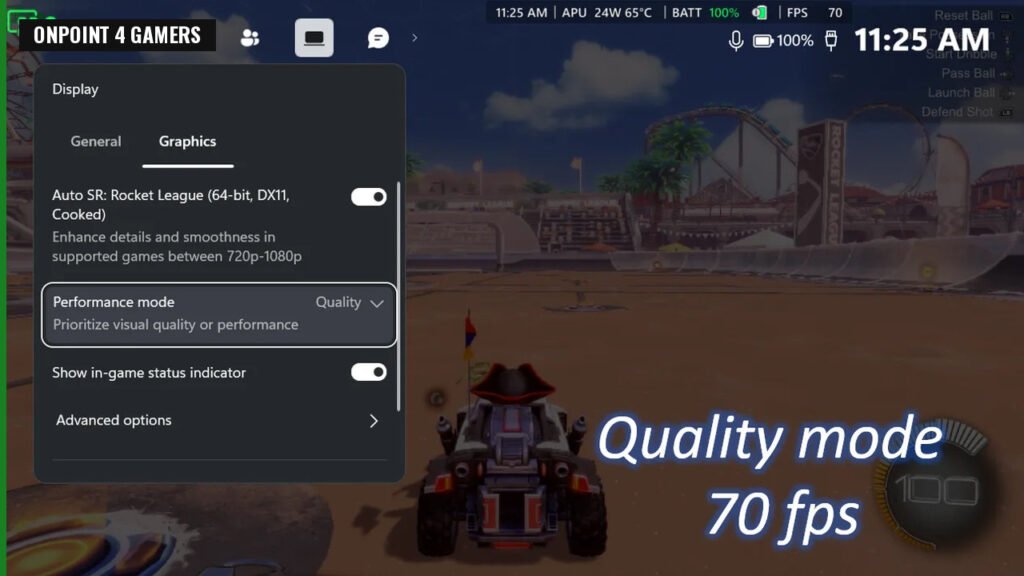
Until now, Auto SR topped out around 60 to 75 FPS. Performance Mode raises that ceiling to up to 120 FPS, which Microsoft calls “almost double what was possible before.” You pick Quality or Performance in Game Bar and can swap between them mid-game while watching your frame rate change.
Microsoft’s own example is Rocket League on the ROG Xbox Ally X at 720p on high settings: Quality Mode averaged 70 FPS, while Performance Mode averaged 115 FPS. That’s Microsoft’s test, not an independent benchmark, but if it holds up across more games, competitive players on the Ally X just got a real reason to flip that switch.
Auto HDR joining the party is the cherry on top. Until now you had to choose between Auto SR and Auto HDR. Now they run together, so games without native HDR can get sharper, smoother and more colorful at the same time on an HDR TV, monitor or the ROG Xbox Ally X20.
Auto SR is live on the Ally X. Which mode are you running?
Vote and see what other Xbox fans think.
Like having a say? Get OnPoint Weekly or argue it out on Discord.
Why this is a win for Xbox’s handheld
The Verge’s headline called Auto SR Microsoft’s DLSS competitor, and that’s the part Xbox and PC fans should pay attention to. This is Microsoft building its own upscaling into Windows and Game Bar, then shipping it first and best on the Xbox-branded handheld. It sits right next to the AMD FSR 4.1 push Xbox has been talking up for the Ally family, which means Ally owners now have more than one path to better image quality and higher frame rates.
That’s the bigger picture here. Xbox isn’t treating the Ally X like a one-off licensing deal with Asus. It keeps stacking platform-level features on it: the full-screen Xbox experience, FSR 4.1 support and now an official Auto SR release shaped, as Microsoft puts it, by Xbox Insider feedback. Every one of those makes the Ally X feel more like an Xbox you can take with you, and less like a Windows laptop in a controller shell.
How to turn it on
Microsoft’s setup is four steps:
- Update Game Bar and install the latest Windows 11 updates.
- Download or update the Auto Super Resolution Package from the Microsoft Store.
- Open Game Bar or press the Xbox button (Win + G on a keyboard) and go to Widgets menu > Display > Graphics.
- Pick Quality or Performance. You can switch any time while you play.
If Performance Mode isn’t showing up yet, that’s the Windows update rollout, not your device. Microsoft is asking for feedback at autosr@microsoft.com, and issues can be reported through Feedback Hub under Game Performance with “Auto SR” in the title.
Image: Microsoft
Sources
- DirectX Developer Blog (Stefan Bojanic, Microsoft): Auto SR Officially Launches on ROG XBOX Ally X and X20, Expands to Copilot+ PCs powered by AMD Ryzen
- The Verge (Jay Peters): Microsoft’s DLSS competitor is out for the Xbox Ally X and works in handheld mode
- X: DirectX 12 announcement
- X: Tom Warren on the Auto SR launch