
A new Xbox Insider update, starting with Alpha Skip-Ahead, adds favorite and shuffling dynamic backgrounds, a right-side Guide option and new ways to sort disc-to-digital games. Asha Sharma says it's about making the Xbox you already own better, not just building the next one.
Your Xbox Home screen doesn’t have to look the same every day anymore. Starting today, Xbox Insiders can save favorite dynamic backgrounds and set them to shuffle automatically, flip the Guide over to the right side of the screen, and sort the games they claimed through disc-to-digital into their own section of the library. Alpha Skip-Ahead members get it first, and Xbox says it will reach more Insiders and players over time.
Xbox detailed the update on Xbox Wire this evening, and Asha Sharma framed it in a way that should land with everyone holding a Series X|S right now. “We’re continuing to invest in making the XBOX you already own better, not just building the next one,” she wrote on X. As of 6:16 PM ET, about 17 minutes after she posted, the post had 2,897 likes.
Rotating home backgrounds are rolling out today, along with more improvements to the console experience. We're continuing to invest in making the XBOX you already own better, not just building the next one. pic.twitter.com/bCRzpcHjX7
, ASHA (@asha_shar) November 12, 2026
Shuffle your Home backgrounds
This is the headliner. You can now mark dynamic backgrounds as favorites by going to Settings > General > Personalization > My background > Dynamic backgrounds, picking one and pressing X. It lands in a new Favorites category.
From there, pick Shuffle at the start of any background category. Your background can change every time you sign in, or on a timer of hourly, daily or weekly. You can shuffle just your favorites or roll through a whole category.
There’s a sneaky great bonus in here too. If you own a controller that unlocks an exclusive background, like the Xbox Wireless Controller X25 Special Edition, saving that background as a favorite lets you keep using it even when the controller isn’t connected. Collectors, that one’s for you.
Disc-to-digital games get their own spot
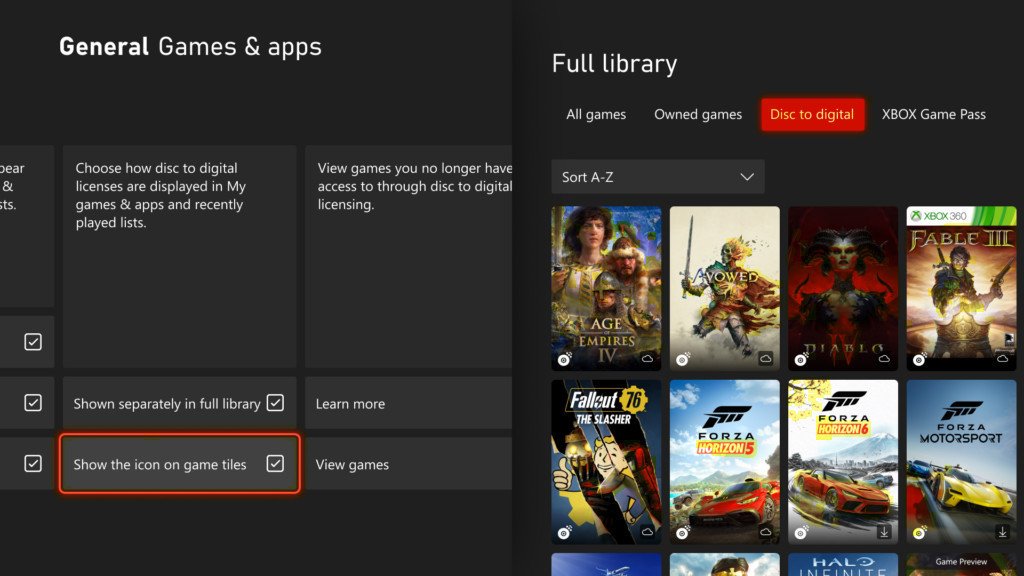
Since August, Xbox players have been able to claim digital licenses for disc-based games. Now Insiders who’ve done that will see those games in a separate category in their full library. If you’d rather keep them mixed in with everything else you own, switch it back in Settings > General > Personalization > Games & apps, and you can hide the digital license icon on game tiles from that same page.
Team left or team right
Insiders can now open the Guide on the right side of the screen instead of the left. Set it in Settings > General > Personalization > Guide. Xbox is literally asking players to tell it whether they’re team left or team right, so expect this one to start some arguments.
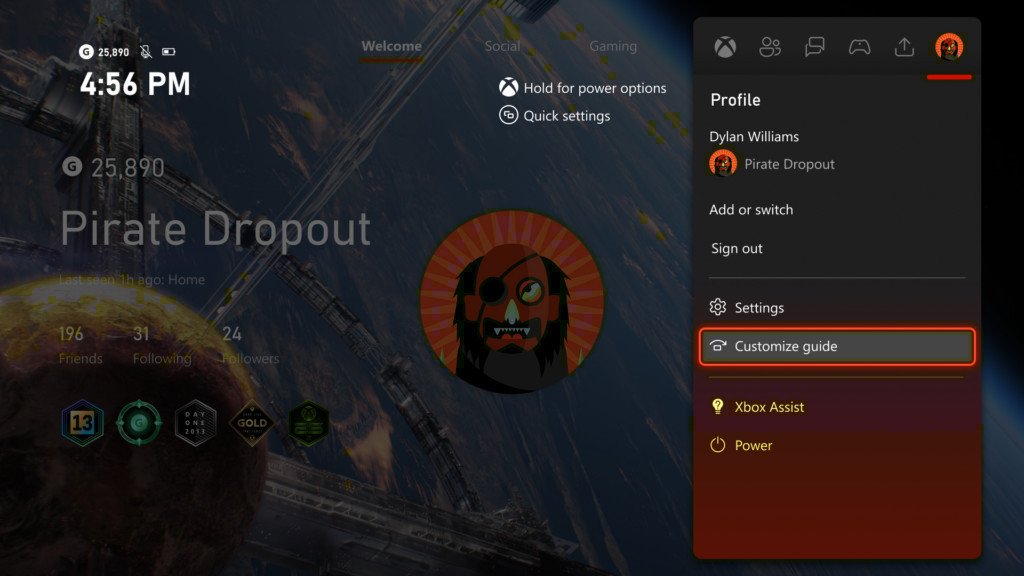
The Guide can finally live on the right. Which team are you?
Vote and see what other Xbox fans think.
Like having a say? Get OnPoint Weekly or argue it out on Discord.
Why it matters
These aren’t giant features on their own, but the message behind them is the story. With all the talk about what comes next for Xbox hardware, Asha is telling current owners plainly that the console under their TV is still getting real attention. Today alone, Xbox has dropped Playback, original Xbox classics on PC with brand new achievements, anniversary freebies and now these Insider dashboard upgrades. That’s a company celebrating 25 years by giving its players more, not asking them to wait for the next box.
The October console update already brought Mythic Achievements to everyone. Today’s dashboard tweaks are still rolling out to Insiders, starting with Alpha Skip-Ahead.
Want in early? You can join the Xbox Insider Program through the Xbox Insider Hub on Xbox Series X|S, Xbox One or Windows PC, and leave feedback at aka.ms/XBOXplayervoice.
Sources
- Xbox Wire: Available for XBOX Insiders: More Ways to Personalize Your Home, Library, and Guide
- Asha Sharma on X: Rotating home backgrounds are rolling out today
- Xbox Insider on X: New features rolling out to Alpha Skip-Ahead
- Tom Warren on X: Background and Guide customization
- Xbox Support: Join the Xbox Insider Program
Image: Xbox / Microsoft (via Xbox Wire)