Microsoft is adding the full Windows Quick settings panel to Xbox mode on PC. Brightness, volume, Wi-Fi, Bluetooth, battery and more, all from the Gaming Task View bar with a controller, no trip to the desktop. It's rolling out gradually to Windows Insiders in the Experimental channel starting with today's build, so not every Insider will see it yet. Here's what's in it, who gets it, and how to try Xbox mode right now.
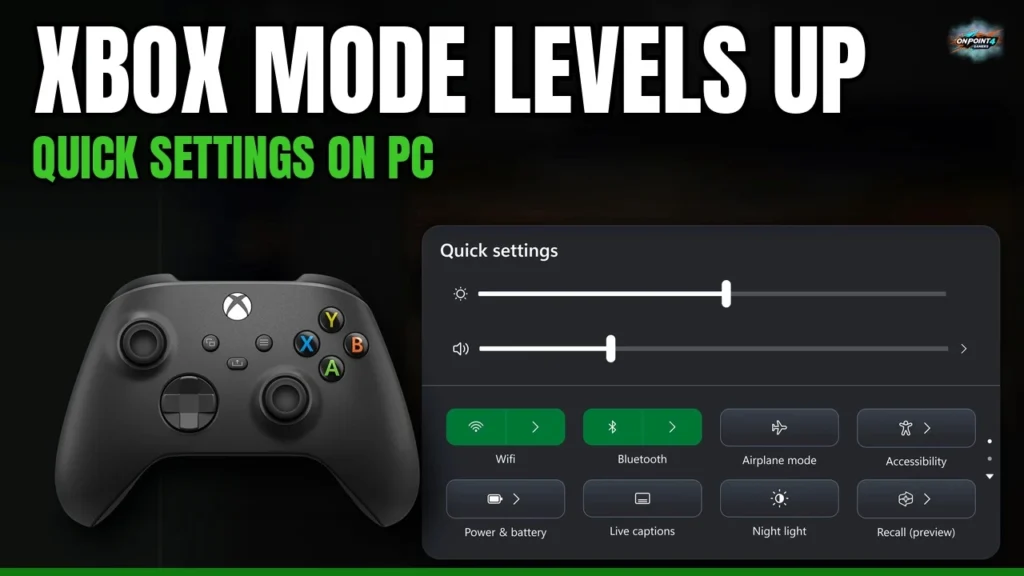
Xbox mode on Windows 11 just got a lot more console-like. Microsoft is adding Quick settings to Xbox mode, so you can change things like brightness, volume, Wi-Fi and Bluetooth without dropping out to the Windows desktop. The Verge’s Tom Warren flagged it on X this afternoon, and the change is spelled out in the release notes for today’s Windows 11 Insider Experimental build 26340.9843.
Microsoft’s wording in the build notes, under the Gaming section: “We’re bringing Quick settings to the Gaming Task View navigation bar in XBOX mode, giving you access to the full set of Quick settings available on the Windows taskbar without having to leave XBOX mode.”

…without having to leave XBOX mode.
What you need to know
- What’s new: Quick settings now live in the Gaming Task View navigation bar inside Xbox mode.
- What’s in it: the full set of Quick settings from the Windows taskbar. Microsoft’s screenshot shows brightness and volume sliders plus Wi-Fi, Bluetooth, Airplane mode, Accessibility, Power & battery, Live captions, Night light and Recall (preview), with more pages below.
- Why it matters: before this, changing a basic system setting meant leaving the controller-friendly Xbox mode and heading back to the desktop.
- Where it is: Windows 11 Insider Preview Build 26340.9843 (KB5127930), Experimental channel (26H2), released October 30, 2026.
- Who gets it now: Windows Insiders on that channel, and it’s rolling out gradually, so not everyone there will see it yet. Microsoft hasn’t given a date for regular Windows 11 users.
How Xbox mode works today
Xbox mode is Microsoft’s controller-first, full screen gaming experience on Windows 11, the same idea as the console dashboard on your PC. Per Microsoft Support, it needs Windows 11 version 24H2 or later and is only available in supported markets.
Turn it on (desktops, laptops, tablets):
- Go to Start > Settings > Gaming > Xbox mode.
- Turn on Enable Xbox mode.
- Optional: turn on Show Xbox mode in Task View.
On gaming handhelds: go to Settings > Gaming > Xbox mode, pick a supported gaming home app under Choose home app, and optionally turn on Enter Xbox mode on startup. Microsoft says that with startup mode on, Windows limits background processes to improve performance while gaming.
Get in and out: press Win + F11, use Game Bar (Win + G or the Xbox button) > Settings, or open Task View (Win + Tab). On a regular desktop or laptop, the Task View route only works if “Show Xbox mode in Task View” is turned on. Task View is also how you jump between open games and apps with the left stick or LB/RB, A to open, X to close.
The new Quick settings button lands right in that Task View bar, which is exactly where your controller already lives.
OnPoint’s take
This is a small line in a build note, and it’s exactly the kind of thing that makes or breaks a couch PC. The whole pitch of Xbox mode is “your PC, but it feels like an Xbox.” Every time you have to grab a mouse to fix your Bluetooth headset or turn the brightness down, that illusion breaks. Now it doesn’t.
What a lot of people will miss: this is Microsoft quietly filling the gaps that keep PC handhelds and living room PCs from feeling like a real console. Steam Deck players have had a Quick Access menu for years, and Xbox mode needed its own answer to compete. Stack it with the Xbox app, Game Pass on PC and the handheld push, and you can see where this is going. Xbox isn’t just a box under your TV anymore, it’s the layer on top of Windows, and these little quality of life wins are how that layer gets good.
The catch is timing. It’s rolling out gradually to Insiders in the Experimental channel, so not everyone will see it yet, and most players won’t get it for a while. Microsoft, ship it fast.
More on OnPoint: RUMOR: Xbox Elite Controller Series 3 LED Panel Shown Off, Reveal Looks Close.
Sources
- Tom Warren on X: Quick settings coming to Xbox mode
- Microsoft Learn: Windows Insider Experimental build 26340.9843 release notes
- Windows Insider Blog: Announcing new builds for 30 October 2026
- Neowin: New Windows 11 Insider builds bring more Search options and refresh AutoPlay
- Pureinfotech: Build 26340.9843 for Windows 11 26H2
- Windows Report: New Windows 11 Experimental build 26340.9843
- Microsoft Support: Windows Gaming: Full screen experience
Image: Microsoft
Xbox mode on PC: where are you at?
Vote and see what other Xbox fans think.
Like having a say? Get OnPoint Weekly or argue it out on Discord.